Natural and expressive shades
Explore wearable colors as well as more noticeable style changes.
Preview how different hair colors work with your complexion and overall look before making a real-world change.
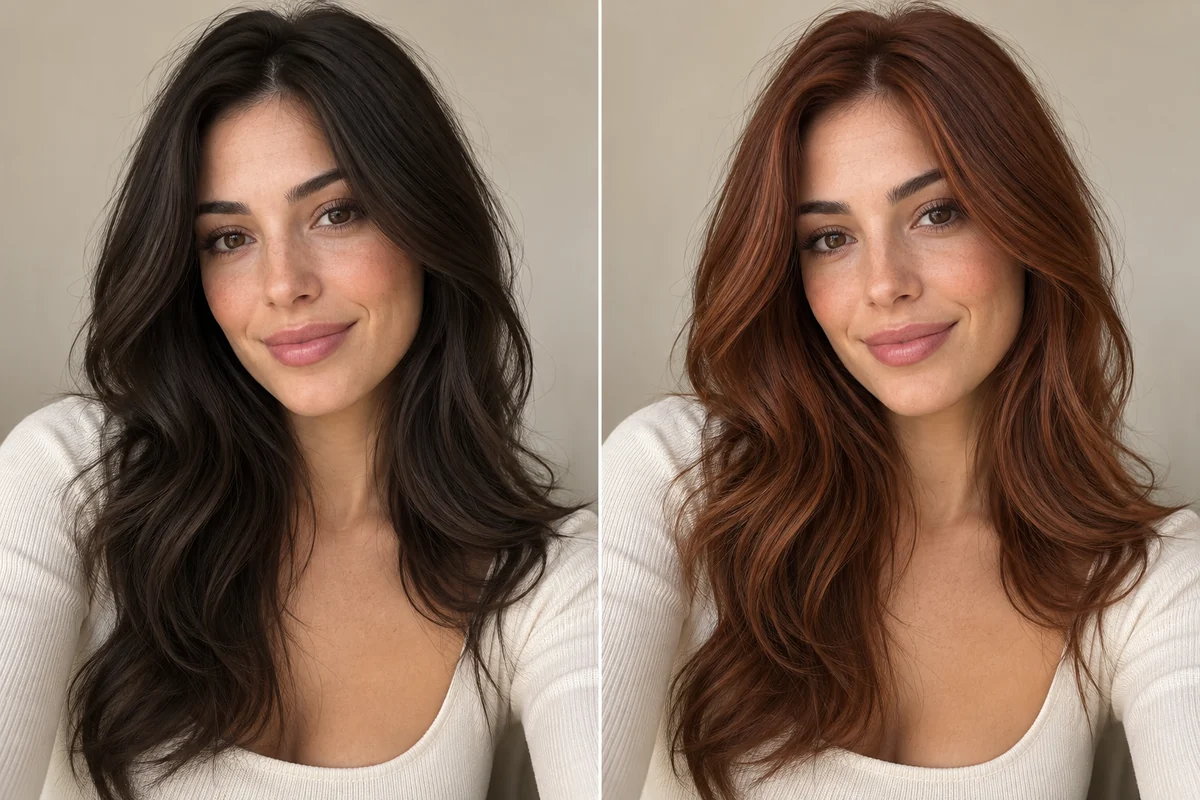
NewYou AI turns a selected style direction and your portrait into a visual preview you can compare.
Explore wearable colors as well as more noticeable style changes.
The hair color tool is designed to focus on color while retaining the existing hairstyle shape.
See the color against your actual complexion instead of relying on a generic model.
Save useful previews and compare several shades before choosing one.
Pick a solo portrait where the relevant face, hair or clothing area is easy to see.
Choose one of the curated options available in NewYou AI.
Save a useful result, share it or compare it with another direction.
The hair color feature is designed to preserve the hairstyle structure and focus on recoloring the hair. AI output can still vary with the source photo.
Yes. A clear portrait with visible hair and balanced lighting works best.
No. It is a visual preview. Final dye results depend on your starting color, hair condition and salon process.
Download NewYou AI for Android and create your own visual preview.
Get it on Google Play